
What Is 7 Layer Network Security? A Complete Guide to Protecting Your Business
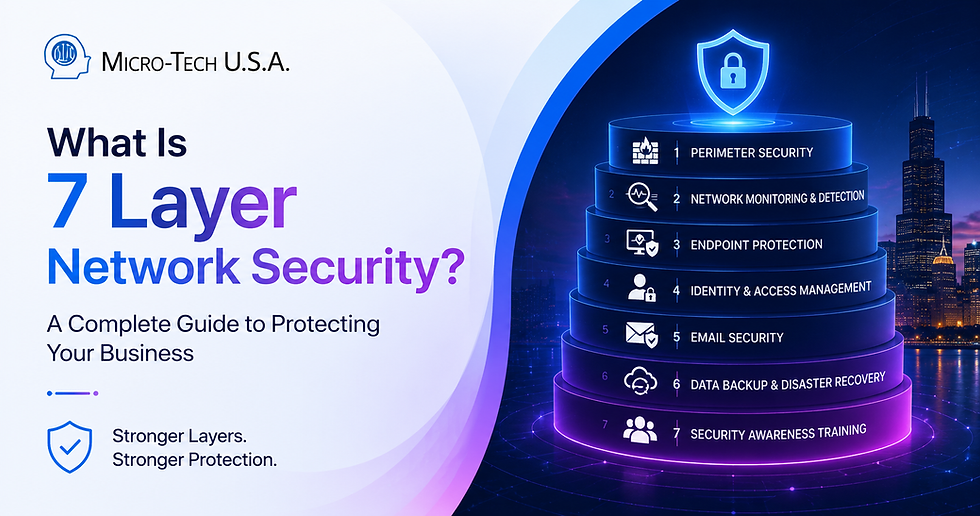
Many business owners believe that network security ends with a firewall. This common misconception leaves companies vulnerable to modern cyber threats like ransomware, phishing, insider attacks, and zero-day exploits. The truth is that effective protection requires multiple layers of security working together.
This post explains the concept of 7-layer network security in simple terms and shows how businesses can build a strong defense to keep their data and systems safe.
Why a Single Security Tool Isn't Enough
Cybercriminals have become more sophisticated, finding ways to bypass traditional defenses like firewalls. For example, phishing emails can trick employees into giving away credentials, which attackers then use to access sensitive systems. Ransomware can slip past perimeter defenses and encrypt critical data before anyone notices.
Because threats come from many angles, relying on just one security tool leaves gaps. That is why layered security has become the industry standard. Each layer adds a new barrier, reducing the chance that an attack will succeed.

What Is 7 Layer Network Security?
The idea behind 7 layer network security is simple: use seven distinct security measures that work together to protect your business. This approach follows the defense-in-depth principle, which means no single layer is your only line of defense. Instead, multiple layers cover each other’s weaknesses.
Think of it like a castle with walls, guards, watchtowers, and traps. If one defense fails, others are ready to stop the enemy.
The Seven Layers Every Business Should Have
Here are the seven key layers businesses need to build a strong security stack:
1. Perimeter Security (Firewalls)
Firewalls control incoming and outgoing network traffic based on security rules. They block unauthorized access and filter harmful data packets before they reach your internal network.
2. Network Monitoring & Detection
Continuous monitoring tools watch network activity for unusual behavior. They alert your team to potential threats like malware spreading or unauthorized logins, enabling quick response.
3. Endpoint Protection
Every device connected to your network—laptops, smartphones, tablets—needs protection. Endpoint security software detects and blocks malware, enforces encryption, and keeps devices updated.
4. Identity & Access Management (MFA)
Strong identity controls ensure only authorized users access systems. Multi-factor authentication (MFA) adds a second verification step, making stolen passwords less useful to attackers.
5. Email Security
Email is a common entry point for phishing and malware. Email security tools scan messages for malicious links and attachments, blocking threats before they reach employees.
6. Data Backup & Disaster Recovery
Regular backups protect your data from ransomware or accidental deletion. A tested disaster recovery plan ensures you can restore operations quickly after an incident.
7. Security Awareness Training
Employees are the last line of defense. Training helps staff recognize phishing emails, use strong passwords, and follow security policies. Well-informed employees reduce the risk of insider threats and human error.
How the Layers Work Together
Imagine an employee receives a phishing email with a malicious link. Email security scans and blocks the message, preventing it from reaching the inbox. If the email slips through, security awareness training helps the employee spot the scam and report it. If the link is clicked, endpoint protection detects suspicious activity and isolates the device. Network monitoring alerts the security team, who can act before ransomware spreads. Meanwhile, data backups ensure files can be restored if encryption occurs.
This layered approach stops attacks at multiple points, reducing damage and downtime.

Common Gaps Businesses Discover
Many companies find weaknesses when reviewing their security:
Legacy hardware that no longer receives updates
Weak or reused passwords
Missing multi-factor authentication
Unpatched software vulnerabilities
Poorly tested backup and recovery processes
Addressing these gaps is critical to building a reliable 7 layer network security system.
Building a Layered Security Strategy
Start with a thorough security assessment to identify risks. Then implement the seven layers with continuous monitoring and regular updates. Employee education should be ongoing, not a one-time event. Many businesses benefit from managed cybersecurity services that provide expert support, 24/7 monitoring, and compliance assistance.
How Micro-Tech Helps
Micro-Tech offers managed cybersecurity services tailored to your business needs. We handle network monitoring, firewall management, cloud security, and compliance support. Our team works with you to build and maintain a strong 7 layer network security strategy, so you can focus on growing your business with confidence.
Strong network security requires more than a firewall. By adopting a 7 layer network security approach, businesses create multiple barriers against evolving cyber threats. Start assessing your current defenses today and build a layered strategy that protects your data, employees, and reputation. Reach out to experts like Micro-Tech to get the support you need for ongoing security and peace of mind.


Comments